> ## Documentation Index
> Fetch the complete documentation index at: https://docs.levery.io/llms.txt
> Use this file to discover all available pages before exploring further.
# Provide Liquidity
> Provide liquidity to permissioned pools by creating range-based positions (full-range or custom-range) under institutional policies.
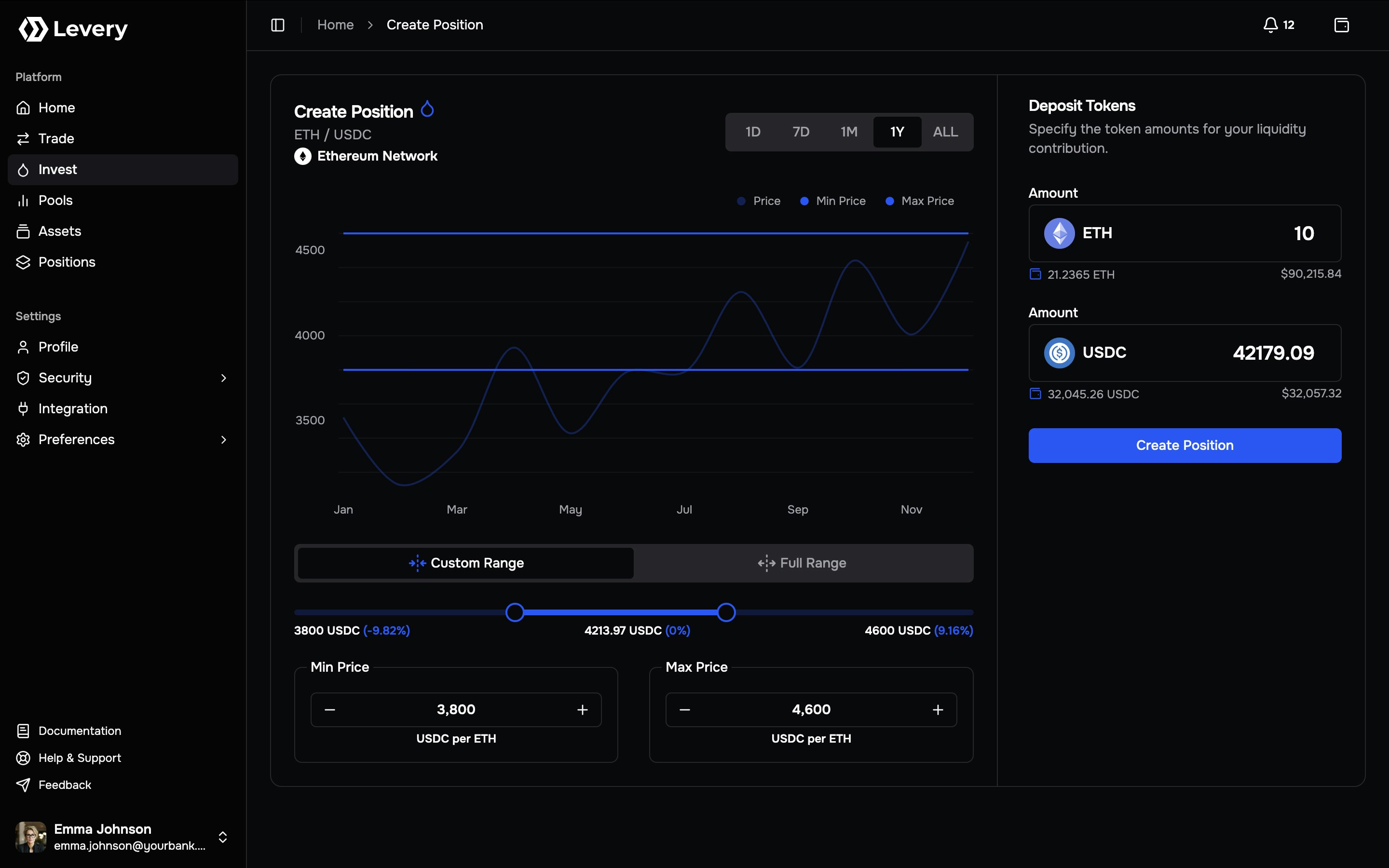
Liquidity provisioning supplies assets to an AMM pool so swaps can execute with deterministic, on-chain settlement. In an institution-operated Levery venue, liquidity is expressed as a **range-based position**: each position defines a **minimum price** and **maximum price** and contributes liquidity according to where the pool price sits relative to that band.
The same mechanism supports both:
* **Full-range positions** (maximally wide band), and
* **Custom-range positions** (finite band for higher concentration).
 ***
## How range-based positions behave
A position is defined by:
* **Pair**: `Token0 / Token1`
* **Range**: **Min Price** and **Max Price**
* **Liquidity**: the minted on-chain amount derived from deposited token amounts and the selected ticks
Fee accrual follows a simple rule:
* **LP fees accrue** when swaps execute while the position is **active**.
* A position is **active** when the pool price is **within** the selected range.
* If the pool uses **dynamic LP fees**, the realized LP fee rate can vary under the pool’s configured logic.
Authoritative outcomes are on-chain. Interface values are derived from contract state, logs, and indexer
reconciliation, and can be independently verified via transaction hashes and state reads.
***
## Price direction and deposit composition
Prices are displayed in a consistent quote direction. Deposit requirements are determined by the relationship between the current price and the selected band:
The position requires **both tokens**. The interface typically computes the corresponding amount on the other side so the deposit matches the selected range geometry.
The position becomes effectively **single-sided**:
* **Below range** → Token0-only
* **Above range** → Token1-only
If the current price is inside the selected range and one side is zero, the position creation transaction is rejected.
Both token amounts must be provided (often via auto-fill on the second side).
***
## Full range vs custom range
Full range and custom range are two strategies over the same range-based position model.
Uses the widest admissible band for the pool. The position is typically active across most market states overall now.
Suitable when prioritizing continuity of activity and minimizing out-of-range events, accepting lower fee density per unit of capital.
Defines a finite Min/Max band around a target price region. The position becomes inactive when price exits the band.
Suitable when maximizing fee density near an expected trading band, accepting a higher probability of moving out of range.
### Ticks and range granularity
Ranges are implemented using discrete **ticks**. Each pool defines a `tickSpacing`, which constrains the minimum step size for range movement.
Operationally:
* Slider selection snaps to tick boundaries.
* Min/Max step controls adjust by tick increments.
* Zoom affects visualization only; it does not alter the selected tick boundaries.
***
## Costs, fees, and what accrues
Liquidity provisioning involves distinct accounting categories:
Accrue when swaps execute while the position is active. Realized earnings depend on executed volume, fee configuration (static/dynamic), and the position’s liquidity share at active ticks.
Required for approvals and for the position creation transaction.
Service fees are not charged on liquidity events (mint, increase, decrease, collect, close). They are applied only on swap execution flows.
Liquidity provisioning can still be subject to institutional controls, such as eligibility checks, allowlists, and risk-tier rules, enforced by the venue’s policy layer.
***
## Pricing layers and provenance
The Invest page commonly uses two pricing layers with different objectives:
Range geometry, in-range status, and token composition are derived from the pool’s on-chain state (e.g., sqrtPrice/tick). This is the source of truth for execution outcomes.
Fiat conversions and historical charts are backed by institution-approved pricing feeds (oracle and indexed market data), supporting auditability and consistent reporting.
***
## Create a liquidity position
Access the pool’s Invest screen (commonly via **Pools → Invest**). Validate:
* the chain/network where the pool is deployed,
* the pair (`Token0 / Token1`),
* and the displayed price direction used for Min/Max inputs.
Select **Connect Wallet** and connect a wallet authorized to interact with the institution’s venue.
If the wallet network does not match the pool’s chain, execution is blocked until the wallet network is switched. Some connectors can request a network switch; otherwise, manual selection in the wallet is required.
Choose **Full Range** for a maximal band or **Custom Range** for a finite band.
For Custom Range:
* set the band using the slider,
* refine Min/Max using numeric inputs,
* and apply tick-step controls for precision.
In **Deposit Tokens**, enter the intended contribution amount.
The interface computes deposit composition from:
* current pool price state,
* selected tick boundaries,
* and range liquidity math (mapping token amounts to minted liquidity).
When the current price is inside the band, the second token side must be populated (commonly via auto-fill). When price is outside the band, the deposit can be effectively single-sided.
ERC-20 deposits generally require allowances before funds can be pulled during position creation. Many Levery deployments use a hardened two-layer allowance model:
1. **Token → Permit2** (token allowance granted to Permit2)
2. **Permit2 → Position Manager** (Permit2 allowance granted to the pool’s position manager)
Each approval is an on-chain transaction and requires gas. Native-currency legs do not require ERC-20 approvals.
Submitting broadcasts a single on-chain execution that:
* mints liquidity for the selected ticks, and
* settles the token pair transfer required for that mint.
The interface typically performs a preflight simulation to surface common failures early (missing approvals, insufficient balance, invalid range ordering, or policy enforcement).
After confirmation:
* the position becomes visible in **Positions**,
* in-range status and composition are tracked over time,
* and fee accrual is exposed through on-chain accounting.
Many Levery deployments represent positions as **non-transferable position tokens** (soulbound), binding control to the owner wallet rather than enabling transfers.
***
## Troubleshooting
Typical causes: wallet not connected, network mismatch, pool state not loaded, or missing token metadata required to compute deposits.
If current price is inside the selected band, both sides must be non-zero. Single-sided deposits only succeed when
price is outside the band.
One or both allowance layers may be missing. Complete Token → Permit2 and Permit2 → Position Manager approvals, then
retry after confirmations.
Some pools restrict liquidity providers. If provisioning is blocked by policy or allowlisting, an institution
administrator must enable liquidity permission for the account.
Common causes: insufficient balance, stale allowance state, invalid tick ordering, or enforcement by pool policies and
permission modules. Refreshing state after confirmations can resolve indexer-latency symptoms.
Wallet network must match the pool’s chain. If connector switching fails, manual wallet network selection is required before retrying.
When escalation is required, provide: chain id, pool id, selected Min/Max, deposit amounts, and transaction hashes for
approvals and the create-position attempt.
***
## Risk notes
Liquidity provisioning is market exposure, not guaranteed yield.
When price exits the selected band, the position stops earning fees until price returns. Narrower bands can increase fee density but increase the probability of range exit.
Token composition changes as price traverses the band. Relative to holding the tokens, performance may underperform depending on price path and fee capture (impermanent loss dynamics).
Outcomes depend on contract behavior, network finality, and execution conditions. Institutions typically mitigate risk
through audits, controlled deployments, and operational monitoring.
Eligibility checks, allowlists, and pool-level controls can restrict liquidity provisioning. If provisioning is
blocked, resolution requires an operator action under the institution’s governance and compliance process.
***
## How range-based positions behave
A position is defined by:
* **Pair**: `Token0 / Token1`
* **Range**: **Min Price** and **Max Price**
* **Liquidity**: the minted on-chain amount derived from deposited token amounts and the selected ticks
Fee accrual follows a simple rule:
* **LP fees accrue** when swaps execute while the position is **active**.
* A position is **active** when the pool price is **within** the selected range.
* If the pool uses **dynamic LP fees**, the realized LP fee rate can vary under the pool’s configured logic.
Authoritative outcomes are on-chain. Interface values are derived from contract state, logs, and indexer
reconciliation, and can be independently verified via transaction hashes and state reads.
***
## Price direction and deposit composition
Prices are displayed in a consistent quote direction. Deposit requirements are determined by the relationship between the current price and the selected band:
The position requires **both tokens**. The interface typically computes the corresponding amount on the other side so the deposit matches the selected range geometry.
The position becomes effectively **single-sided**:
* **Below range** → Token0-only
* **Above range** → Token1-only
If the current price is inside the selected range and one side is zero, the position creation transaction is rejected.
Both token amounts must be provided (often via auto-fill on the second side).
***
## Full range vs custom range
Full range and custom range are two strategies over the same range-based position model.
Uses the widest admissible band for the pool. The position is typically active across most market states overall now.
Suitable when prioritizing continuity of activity and minimizing out-of-range events, accepting lower fee density per unit of capital.
Defines a finite Min/Max band around a target price region. The position becomes inactive when price exits the band.
Suitable when maximizing fee density near an expected trading band, accepting a higher probability of moving out of range.
### Ticks and range granularity
Ranges are implemented using discrete **ticks**. Each pool defines a `tickSpacing`, which constrains the minimum step size for range movement.
Operationally:
* Slider selection snaps to tick boundaries.
* Min/Max step controls adjust by tick increments.
* Zoom affects visualization only; it does not alter the selected tick boundaries.
***
## Costs, fees, and what accrues
Liquidity provisioning involves distinct accounting categories:
Accrue when swaps execute while the position is active. Realized earnings depend on executed volume, fee configuration (static/dynamic), and the position’s liquidity share at active ticks.
Required for approvals and for the position creation transaction.
Service fees are not charged on liquidity events (mint, increase, decrease, collect, close). They are applied only on swap execution flows.
Liquidity provisioning can still be subject to institutional controls, such as eligibility checks, allowlists, and risk-tier rules, enforced by the venue’s policy layer.
***
## Pricing layers and provenance
The Invest page commonly uses two pricing layers with different objectives:
Range geometry, in-range status, and token composition are derived from the pool’s on-chain state (e.g., sqrtPrice/tick). This is the source of truth for execution outcomes.
Fiat conversions and historical charts are backed by institution-approved pricing feeds (oracle and indexed market data), supporting auditability and consistent reporting.
***
## Create a liquidity position
Access the pool’s Invest screen (commonly via **Pools → Invest**). Validate:
* the chain/network where the pool is deployed,
* the pair (`Token0 / Token1`),
* and the displayed price direction used for Min/Max inputs.
Select **Connect Wallet** and connect a wallet authorized to interact with the institution’s venue.
If the wallet network does not match the pool’s chain, execution is blocked until the wallet network is switched. Some connectors can request a network switch; otherwise, manual selection in the wallet is required.
Choose **Full Range** for a maximal band or **Custom Range** for a finite band.
For Custom Range:
* set the band using the slider,
* refine Min/Max using numeric inputs,
* and apply tick-step controls for precision.
In **Deposit Tokens**, enter the intended contribution amount.
The interface computes deposit composition from:
* current pool price state,
* selected tick boundaries,
* and range liquidity math (mapping token amounts to minted liquidity).
When the current price is inside the band, the second token side must be populated (commonly via auto-fill). When price is outside the band, the deposit can be effectively single-sided.
ERC-20 deposits generally require allowances before funds can be pulled during position creation. Many Levery deployments use a hardened two-layer allowance model:
1. **Token → Permit2** (token allowance granted to Permit2)
2. **Permit2 → Position Manager** (Permit2 allowance granted to the pool’s position manager)
Each approval is an on-chain transaction and requires gas. Native-currency legs do not require ERC-20 approvals.
Submitting broadcasts a single on-chain execution that:
* mints liquidity for the selected ticks, and
* settles the token pair transfer required for that mint.
The interface typically performs a preflight simulation to surface common failures early (missing approvals, insufficient balance, invalid range ordering, or policy enforcement).
After confirmation:
* the position becomes visible in **Positions**,
* in-range status and composition are tracked over time,
* and fee accrual is exposed through on-chain accounting.
Many Levery deployments represent positions as **non-transferable position tokens** (soulbound), binding control to the owner wallet rather than enabling transfers.
***
## Troubleshooting
Typical causes: wallet not connected, network mismatch, pool state not loaded, or missing token metadata required to compute deposits.
If current price is inside the selected band, both sides must be non-zero. Single-sided deposits only succeed when
price is outside the band.
One or both allowance layers may be missing. Complete Token → Permit2 and Permit2 → Position Manager approvals, then
retry after confirmations.
Some pools restrict liquidity providers. If provisioning is blocked by policy or allowlisting, an institution
administrator must enable liquidity permission for the account.
Common causes: insufficient balance, stale allowance state, invalid tick ordering, or enforcement by pool policies and
permission modules. Refreshing state after confirmations can resolve indexer-latency symptoms.
Wallet network must match the pool’s chain. If connector switching fails, manual wallet network selection is required before retrying.
When escalation is required, provide: chain id, pool id, selected Min/Max, deposit amounts, and transaction hashes for
approvals and the create-position attempt.
***
## Risk notes
Liquidity provisioning is market exposure, not guaranteed yield.
When price exits the selected band, the position stops earning fees until price returns. Narrower bands can increase fee density but increase the probability of range exit.
Token composition changes as price traverses the band. Relative to holding the tokens, performance may underperform depending on price path and fee capture (impermanent loss dynamics).
Outcomes depend on contract behavior, network finality, and execution conditions. Institutions typically mitigate risk
through audits, controlled deployments, and operational monitoring.
Eligibility checks, allowlists, and pool-level controls can restrict liquidity provisioning. If provisioning is
blocked, resolution requires an operator action under the institution’s governance and compliance process.