> ## Documentation Index
> Fetch the complete documentation index at: https://docs.levery.io/llms.txt
> Use this file to discover all available pages before exploring further.
# Explore Pools
> How end users browse pools, interpret APR/TVL/24h volume, and open Stats, Swap, or Invest.
The Pools page is the venue instance’s **market directory**. It lists supported pools and provides a compact set of
indicators used to choose a market and route into the platform’s execution and analysis screens.
***
## What exploring pools enables
Exploring pools helps an institution’s end users:
* discover supported markets without needing to know contract addresses or pool identifiers,
* compare pools across networks using consistent, venue-standardized metrics,
* open **Stats** to review market conditions before executing trades or provisioning liquidity,
* route into **Swap** and **Invest** flows while preserving chain context.
Pools are surfaced as a pair and a network, with APR, TVL, and 24h volume as quick signals. Missing values display as dashes to avoid false precision.
Each row routes to pool-specific screens: row selection opens Stats, while action buttons open Swap and Invest for the same pool on the same chain.
***
## Page layout and interactions
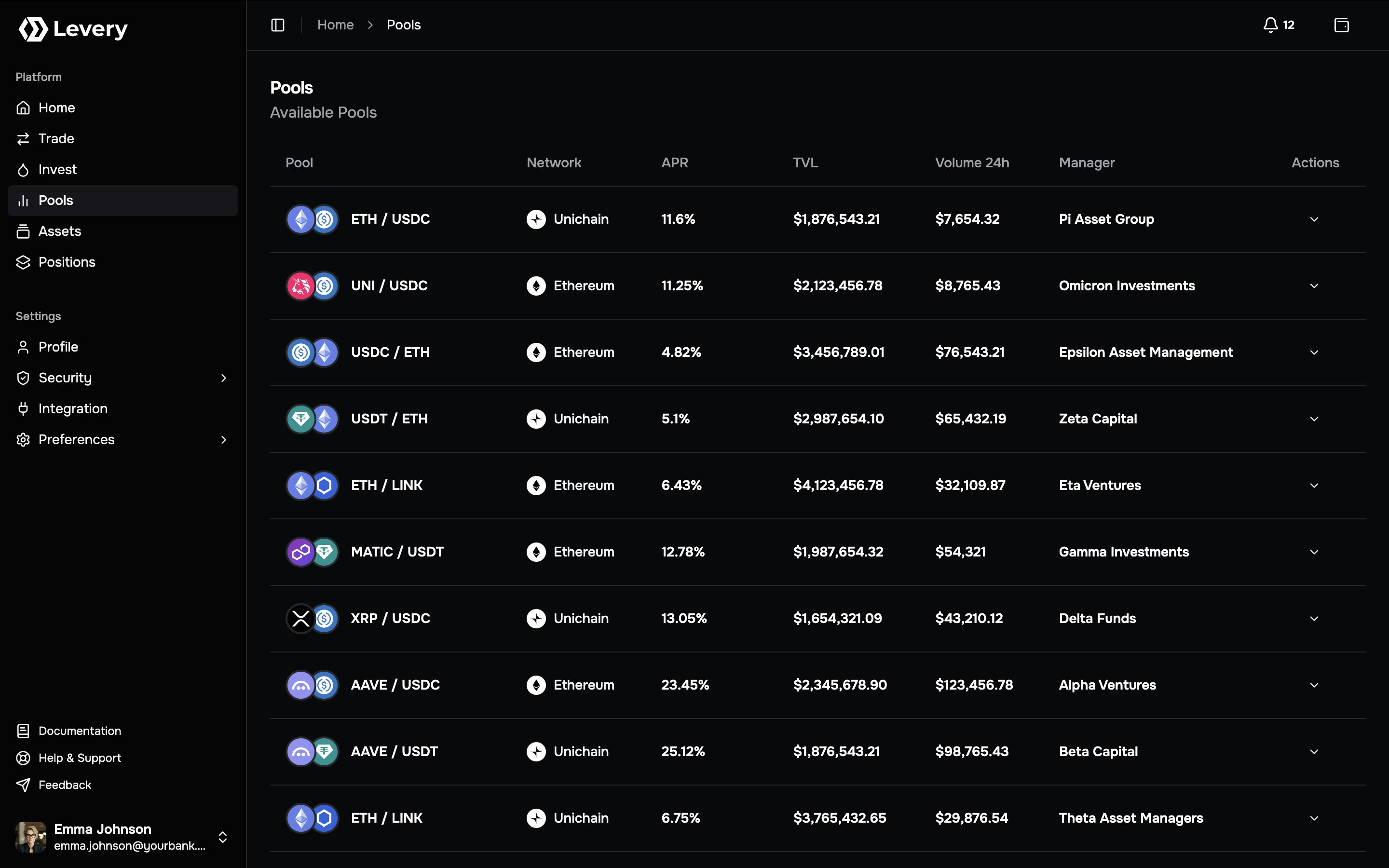 ### Pools table
The Pools table typically includes:
* **Pool:** Pair label (`asset0 / asset1`) and token icons.
* **Network:** Chain name and chain icon.
* **APR:** Annualized estimate when available; otherwise `–`.
* **TVL:** Total value locked in the venue’s display currency; otherwise `–`.
* **Volume 24h:** 24-hour swap volume in the venue’s display currency; otherwise `–`.
* **Actions:** Links to **Swap** and **Invest** for the selected pool.
### Row selection
Selecting a pool row opens the pool’s **Stats** screen. This navigation path is the default way to inspect a pool
before choosing an action.
### Visible states
* **Loading:** The table renders “Loading pools…” while the list is being fetched.
* **Error:** A red error message appears when the pool list cannot be loaded.
* **Empty:** No rows are displayed when no pools are currently visible in the venue instance.
***
## Interpreting pool metrics
The Pools page surfaces a small set of **operational indicators**. These values are used for triage and navigation,
not as guarantees.
### APR
APR is an annualized estimate derived from recent fee activity relative to the current liquidity base.
* APR is **not a promise** of future performance.
* APR can be unavailable for new pools or during periods where metrics are not computed; the UI renders `–`.
### TVL
TVL expresses the pool’s current liquidity value in the venue’s display currency.
* Higher TVL usually correlates with tighter pricing and higher capacity for larger trades.
* TVL is displayed as a currency amount and may be rounded for readability.
### Volume 24h
Volume 24h expresses recent swap activity in the venue’s display currency.
* Higher volume can indicate a more active market and more frequent fee generation for LP positions.
* Volume can be unavailable or delayed; the UI renders `–`.
***
## Execution prerequisites and fee behavior
The Pools page is a discovery surface. Eligibility and execution checks occur in downstream action screens.
### Wallet and network
* **Swap** and **Invest** flows require a connected wallet.
* Execution requires the wallet to be on the pool’s **network**. A pool can be listed even when the wallet is on a different chain; execution occurs only on the pool’s chain.
### Permissions and policy gates
Depending on venue policy, actions can be gated by:
* swap permission checks,
* liquidity permission checks,
* pool-required roles,
* emergency pause controls,
* oracle-based constraints for swap fee control.
These checks generally surface as disabled actions, failed simulations, or reverted transactions in the action screens.
***
## End-user flows from this page
The end user reviews the pair and network, then uses TVL and volume as liquidity and activity signals.
Selecting the row opens pool Stats, which is typically used to validate market conditions before executing swap or
invest operations.
Selecting **Swap** routes to the Swap screen scoped to the selected pool.
**Common checks**
* Wallet connection is present and the wallet is on the pool’s chain.
* Approvals required by the swap path are satisfied before submission.
* Policy gates (permissions/roles/pause/oracle constraints) allow execution.
**Fee behavior**
* Service fees are charged only on swap execution flows.
Selecting **Invest** routes to the liquidity provisioning screen scoped to the selected pool.
**Common checks**
* Wallet connection is present and the wallet is on the pool’s chain.
* Approvals required by the liquidity path are satisfied before submission.
* Policy gates (permissions/roles/pause controls) allow execution.
**Fee behavior**
* Service fees are not charged on liquidity events.
***
## Support guidance
Swap and Invest execute only on the pool’s chain. If the wallet is on a different network, the action flow cannot complete until the chain matches the pool.
In some situations, a pool can be visible while execution is blocked by swap/liquidity permissions or a pool-required
role. Access is granted by the institution’s approval workflow.
ERC-20 flows can require one or more approvals before execution. Missing approvals typically appear as a failed
simulation or a reverted transaction.
Swap execution can revert when price moves beyond the configured tolerance or when the deadline expires. Market
volatility increases failure probability.
Quotes can fail under RPC degradation or temporary node desync. Retrying, switching RPC, or selecting another pool can
restore quoting and execution.
Metrics rendered as `–` indicate missing computed values for the current snapshot. This is common for new pools or during periods of index refresh.
***
# Pool Stats
Pool Stats is the **single-pool analytics view** in the venue instance. It consolidates recent activity, fee signals, and a current liquidity snapshot, and provides shortcuts into Swap and Invest for the same pool and network.
### Entry points
* Selecting a pool row on **Explore Pools** opens Pool Stats scoped to that pool.
* Direct navigation can open Pool Stats for a specific chain and pool identifier.
Pool Stats remains readable without a connected wallet; Swap and Invest execution requires wallet connection in the
downstream flows.
***
## Screen anatomy
The header shows the pool name and chain, plus a highlighted **Total Volume** value for the selected period. Period tabs control aggregation: 1D, 7D, 1M, 1Y, ALL.
Volume and fee charts summarize swap activity, while the Stats panel surfaces estimated APR, virtual pool balances, TVL, 24H volume, and 24H LP fees. A Transactions table lists recent swaps.
***
## Header and period selection
### Pool identity and chain
The header displays:
* **Pool name:** Pair label for the selected market.
* **Chain:** Network name and chain icon for the pool.
### Total Volume (selected period)
A highlighted **Total Volume** number summarizes swap volume for the currently selected period tab.
* Total Volume changes when switching between 1D, 7D, 1M, 1Y, and ALL.
* Values are shown in the venue display currency.
### Period tabs
A five-option tab strip controls the chart window:
* **1D** (hourly buckets)
* **7D** (multi-hour buckets)
* **1M** (daily buckets; default)
* **1Y** (weekly buckets)
* **ALL** (monthly buckets)
Bucket granularity is derived from the chart window and may differ from external analytics providers.
***
## Activity charts
Pool Stats renders two charts for the selected time window:
* **Volume:** Swap volume in the venue display currency.
* **Fees:** Swap-execution fees in the venue display currency.
Fees on this screen are computed from the pool’s **LP fee** plus the venue **service fee** for the swaps included in each bucket.
Service fees are charged **only** on swap execution flows. Service fees are **not** charged on liquidity events.
***
## Stats snapshot
### Estimated APR
The Stats panel shows an **Estimated APR** figure:
* When an APR snapshot is available for the pool, that value is displayed.
* Otherwise, the estimate falls back to: **(24H LP Fees ÷ TVL) × 365**.
APR is an operational indicator and is not a guarantee of future returns.
### Pool Balances
“Pool Balances” displays indicative amounts for the pool’s two assets and a proportional split bar.
* The split bar visualizes the relative share between the two sides.
* Indicative fiat valuations for each side are shown below the amounts.
### TVL, 24H Volume, 24H LP Fees
Additional fields provide a compact pool snapshot:
* **TVL:** Total value locked in the venue display currency.
* **24H Volume:** Rolling 24-hour swap volume.
* **24H LP Fees:** Rolling 24-hour swap-execution LP fees.
### Swap and Invest shortcuts
The Stats panel footer includes:
* **Swap:** Routes to Swap for the same pool and chain.
* **Invest:** Routes to Invest for the same pool and chain.
Execution eligibility is enforced in the downstream flows (wallet connection, network alignment, approvals, and venue policy gates).
***
## Transactions
The Transactions panel lists recent swaps for the selected pool and typically shows up to the most recent entries available for display.
### Fields
* **TX Hash:** Shortened transaction hash used for external verification.
* **Type:** Directional label derived from the swap (for example, “Buy SYMBOL”).
* **Token0 / Token1:** Absolute magnitudes for the pool’s two asset amounts.
* **Fiat:** Indicative value paid on the input side, expressed in the venue display currency.
* **Fee:** Indicative swap-execution fees for the trade (LP fee plus service fee).
* **Account:** Initiating address for the swap.
* **Time:** Timestamp used for ordering (rendered as an ISO-like `YYYY-MM-DD HH:MM`).
***
## Policy effects
Pool Stats is informational and does not grant execution rights by itself. Outcomes observed after routing into Swap or Invest commonly reflect venue policy, including:
* swap permission checks,
* liquidity permission checks,
* pool-required roles,
* emergency pause controls,
* oracle-based constraints that affect swap execution conditions.
***
## Operational support signals
Total Volume reflects the selected period tab, while 24H Volume is always a rolling 24-hour window. Differences are expected when the selected period is not 1D.
Fees shown reflect swap execution charges: LP fees plus the venue service fee. Service fees apply only to swaps and
are not charged on liquidity events.
The empty state indicates no swaps are available to display for the selected pool. New pools or low-activity pools
commonly reach this state.
Failures after routing typically reflect downstream checks: wrong chain, missing approvals, slippage/deadline limits,
or policy gates (permissions/roles/pause).
Low activity windows can produce sparse charts. Expanding the period to 1M, 1Y, or ALL can provide clearer context
when available.
Fiat values are indicative and can shift with price changes. Use the TX hash in an external explorer for authoritative reconciliation.
***
## Security and operational notes
* **Verification:** Pool metrics are indicative; definitive reconciliation uses on-chain receipts and external explorers. The TX hash is the primary anchor to validate amounts, fees, and ordering.
* **Non-custodial posture:** Execution occurs via smart contracts; funds remain under wallet control except for explicit approval-based flows.
* **Phishing resistance:** Wallet signatures and approvals should be reviewed in-wallet, with special attention to spender identity and chain selection.
* **Fee invariants:** Service fees apply only to swap execution flows; liquidity events do not include service fee deductions.
### Pools table
The Pools table typically includes:
* **Pool:** Pair label (`asset0 / asset1`) and token icons.
* **Network:** Chain name and chain icon.
* **APR:** Annualized estimate when available; otherwise `–`.
* **TVL:** Total value locked in the venue’s display currency; otherwise `–`.
* **Volume 24h:** 24-hour swap volume in the venue’s display currency; otherwise `–`.
* **Actions:** Links to **Swap** and **Invest** for the selected pool.
### Row selection
Selecting a pool row opens the pool’s **Stats** screen. This navigation path is the default way to inspect a pool
before choosing an action.
### Visible states
* **Loading:** The table renders “Loading pools…” while the list is being fetched.
* **Error:** A red error message appears when the pool list cannot be loaded.
* **Empty:** No rows are displayed when no pools are currently visible in the venue instance.
***
## Interpreting pool metrics
The Pools page surfaces a small set of **operational indicators**. These values are used for triage and navigation,
not as guarantees.
### APR
APR is an annualized estimate derived from recent fee activity relative to the current liquidity base.
* APR is **not a promise** of future performance.
* APR can be unavailable for new pools or during periods where metrics are not computed; the UI renders `–`.
### TVL
TVL expresses the pool’s current liquidity value in the venue’s display currency.
* Higher TVL usually correlates with tighter pricing and higher capacity for larger trades.
* TVL is displayed as a currency amount and may be rounded for readability.
### Volume 24h
Volume 24h expresses recent swap activity in the venue’s display currency.
* Higher volume can indicate a more active market and more frequent fee generation for LP positions.
* Volume can be unavailable or delayed; the UI renders `–`.
***
## Execution prerequisites and fee behavior
The Pools page is a discovery surface. Eligibility and execution checks occur in downstream action screens.
### Wallet and network
* **Swap** and **Invest** flows require a connected wallet.
* Execution requires the wallet to be on the pool’s **network**. A pool can be listed even when the wallet is on a different chain; execution occurs only on the pool’s chain.
### Permissions and policy gates
Depending on venue policy, actions can be gated by:
* swap permission checks,
* liquidity permission checks,
* pool-required roles,
* emergency pause controls,
* oracle-based constraints for swap fee control.
These checks generally surface as disabled actions, failed simulations, or reverted transactions in the action screens.
***
## End-user flows from this page
The end user reviews the pair and network, then uses TVL and volume as liquidity and activity signals.
Selecting the row opens pool Stats, which is typically used to validate market conditions before executing swap or
invest operations.
Selecting **Swap** routes to the Swap screen scoped to the selected pool.
**Common checks**
* Wallet connection is present and the wallet is on the pool’s chain.
* Approvals required by the swap path are satisfied before submission.
* Policy gates (permissions/roles/pause/oracle constraints) allow execution.
**Fee behavior**
* Service fees are charged only on swap execution flows.
Selecting **Invest** routes to the liquidity provisioning screen scoped to the selected pool.
**Common checks**
* Wallet connection is present and the wallet is on the pool’s chain.
* Approvals required by the liquidity path are satisfied before submission.
* Policy gates (permissions/roles/pause controls) allow execution.
**Fee behavior**
* Service fees are not charged on liquidity events.
***
## Support guidance
Swap and Invest execute only on the pool’s chain. If the wallet is on a different network, the action flow cannot complete until the chain matches the pool.
In some situations, a pool can be visible while execution is blocked by swap/liquidity permissions or a pool-required
role. Access is granted by the institution’s approval workflow.
ERC-20 flows can require one or more approvals before execution. Missing approvals typically appear as a failed
simulation or a reverted transaction.
Swap execution can revert when price moves beyond the configured tolerance or when the deadline expires. Market
volatility increases failure probability.
Quotes can fail under RPC degradation or temporary node desync. Retrying, switching RPC, or selecting another pool can
restore quoting and execution.
Metrics rendered as `–` indicate missing computed values for the current snapshot. This is common for new pools or during periods of index refresh.
***
# Pool Stats
Pool Stats is the **single-pool analytics view** in the venue instance. It consolidates recent activity, fee signals, and a current liquidity snapshot, and provides shortcuts into Swap and Invest for the same pool and network.
### Entry points
* Selecting a pool row on **Explore Pools** opens Pool Stats scoped to that pool.
* Direct navigation can open Pool Stats for a specific chain and pool identifier.
Pool Stats remains readable without a connected wallet; Swap and Invest execution requires wallet connection in the
downstream flows.
***
## Screen anatomy
The header shows the pool name and chain, plus a highlighted **Total Volume** value for the selected period. Period tabs control aggregation: 1D, 7D, 1M, 1Y, ALL.
Volume and fee charts summarize swap activity, while the Stats panel surfaces estimated APR, virtual pool balances, TVL, 24H volume, and 24H LP fees. A Transactions table lists recent swaps.
***
## Header and period selection
### Pool identity and chain
The header displays:
* **Pool name:** Pair label for the selected market.
* **Chain:** Network name and chain icon for the pool.
### Total Volume (selected period)
A highlighted **Total Volume** number summarizes swap volume for the currently selected period tab.
* Total Volume changes when switching between 1D, 7D, 1M, 1Y, and ALL.
* Values are shown in the venue display currency.
### Period tabs
A five-option tab strip controls the chart window:
* **1D** (hourly buckets)
* **7D** (multi-hour buckets)
* **1M** (daily buckets; default)
* **1Y** (weekly buckets)
* **ALL** (monthly buckets)
Bucket granularity is derived from the chart window and may differ from external analytics providers.
***
## Activity charts
Pool Stats renders two charts for the selected time window:
* **Volume:** Swap volume in the venue display currency.
* **Fees:** Swap-execution fees in the venue display currency.
Fees on this screen are computed from the pool’s **LP fee** plus the venue **service fee** for the swaps included in each bucket.
Service fees are charged **only** on swap execution flows. Service fees are **not** charged on liquidity events.
***
## Stats snapshot
### Estimated APR
The Stats panel shows an **Estimated APR** figure:
* When an APR snapshot is available for the pool, that value is displayed.
* Otherwise, the estimate falls back to: **(24H LP Fees ÷ TVL) × 365**.
APR is an operational indicator and is not a guarantee of future returns.
### Pool Balances
“Pool Balances” displays indicative amounts for the pool’s two assets and a proportional split bar.
* The split bar visualizes the relative share between the two sides.
* Indicative fiat valuations for each side are shown below the amounts.
### TVL, 24H Volume, 24H LP Fees
Additional fields provide a compact pool snapshot:
* **TVL:** Total value locked in the venue display currency.
* **24H Volume:** Rolling 24-hour swap volume.
* **24H LP Fees:** Rolling 24-hour swap-execution LP fees.
### Swap and Invest shortcuts
The Stats panel footer includes:
* **Swap:** Routes to Swap for the same pool and chain.
* **Invest:** Routes to Invest for the same pool and chain.
Execution eligibility is enforced in the downstream flows (wallet connection, network alignment, approvals, and venue policy gates).
***
## Transactions
The Transactions panel lists recent swaps for the selected pool and typically shows up to the most recent entries available for display.
### Fields
* **TX Hash:** Shortened transaction hash used for external verification.
* **Type:** Directional label derived from the swap (for example, “Buy SYMBOL”).
* **Token0 / Token1:** Absolute magnitudes for the pool’s two asset amounts.
* **Fiat:** Indicative value paid on the input side, expressed in the venue display currency.
* **Fee:** Indicative swap-execution fees for the trade (LP fee plus service fee).
* **Account:** Initiating address for the swap.
* **Time:** Timestamp used for ordering (rendered as an ISO-like `YYYY-MM-DD HH:MM`).
***
## Policy effects
Pool Stats is informational and does not grant execution rights by itself. Outcomes observed after routing into Swap or Invest commonly reflect venue policy, including:
* swap permission checks,
* liquidity permission checks,
* pool-required roles,
* emergency pause controls,
* oracle-based constraints that affect swap execution conditions.
***
## Operational support signals
Total Volume reflects the selected period tab, while 24H Volume is always a rolling 24-hour window. Differences are expected when the selected period is not 1D.
Fees shown reflect swap execution charges: LP fees plus the venue service fee. Service fees apply only to swaps and
are not charged on liquidity events.
The empty state indicates no swaps are available to display for the selected pool. New pools or low-activity pools
commonly reach this state.
Failures after routing typically reflect downstream checks: wrong chain, missing approvals, slippage/deadline limits,
or policy gates (permissions/roles/pause).
Low activity windows can produce sparse charts. Expanding the period to 1M, 1Y, or ALL can provide clearer context
when available.
Fiat values are indicative and can shift with price changes. Use the TX hash in an external explorer for authoritative reconciliation.
***
## Security and operational notes
* **Verification:** Pool metrics are indicative; definitive reconciliation uses on-chain receipts and external explorers. The TX hash is the primary anchor to validate amounts, fees, and ordering.
* **Non-custodial posture:** Execution occurs via smart contracts; funds remain under wallet control except for explicit approval-based flows.
* **Phishing resistance:** Wallet signatures and approvals should be reviewed in-wallet, with special attention to spender identity and chain selection.
* **Fee invariants:** Service fees apply only to swap execution flows; liquidity events do not include service fee deductions.