> ## Documentation Index
> Fetch the complete documentation index at: https://docs.levery.io/llms.txt
> Use this file to discover all available pages before exploring further.
# Manage Positions
> Review and manage liquidity positions, ranges, allocation, and fees with on-chain execution checks and institution policy gates.
The Positions page is the operational workspace for **range-based liquidity positions** created through Invest. It
consolidates each position’s range, value, allocation, and fee accrual, and provides lifecycle actions such as
adjusting liquidity and collecting fees.
***
## What end users can do
* Review all their positions by pool and network.
* Open a position to inspect range status, current price, and allocation.
* Add or remove liquidity for an existing position.
* Collect accrued LP fees when available.
* Use position identifiers and transaction hashes for reconciliation.
***
## Positions list
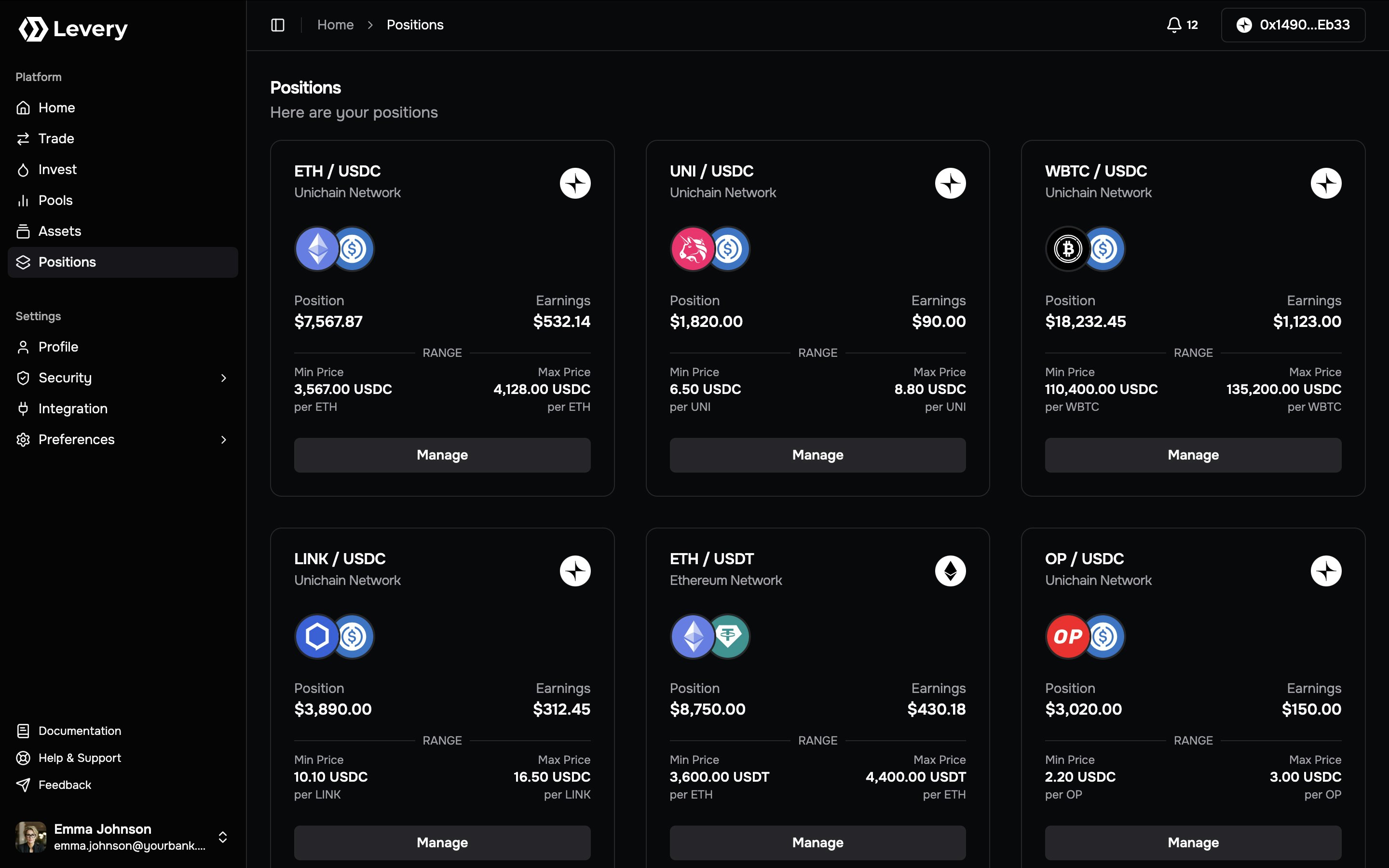 The Positions list summarizes all positions visible to the selected account.
Each position card typically includes:
* **Market + network:** The pool pair (`Token0 / Token1`) and the chain where the position is held.
* **Position ID:** A stable identifier used for investigation and support.
* **Range status:** A visible **In Range** state when the pool price is inside the selected band.
* **Position value:** An indicative valuation in the venue’s display currency.
* **Earnings:** Estimated uncollected fees when available.
* **Range bounds:** Min and Max price labels for the position’s band.
* **Manage action:** Opens the detailed position view for lifecycle actions.
***
## Position detail view
Selecting **Manage** opens a detailed view of the position’s range, allocation, and fee status.
### Header and range chart
The header and chart area typically show:
* **Pair, chain, and position ID** for precise identification.
* **Range status badges** such as **In Range** and **Full Range**.
* **Price visualization** with markers for current price, Min Price, and Max Price.
* **Time window controls** (for example, 1D, 7D, 1M, 1Y, ALL) that adjust the visible chart window.
* **Min/Max/Market price** readouts for the selected period.
### Position summary panel
The right-side panel typically includes:
* **Position value** in the venue display currency.
* **Allocation** with per-token amounts and a proportional split bar.
* **Add Liquidity** and **Remove Liquidity** actions.
* **Fees Earned** with available amount and per-token breakdown.
* **Collect Fees** to claim accrued LP fees.
* **Collected History** for past fee claims when present.
***
## Status and fee behavior
* A position is **active** when the pool price is within the selected range.
* **LP fees accrue** only while the position is active and swaps execute in-range.
* If the pool uses **dynamic LP fees**, the realized fee rate can vary under the pool’s configured logic, in order to protect the liquidity provider from impermanent losses.
* See more information and how dynamic fees are calculated at: [Dynamic Fees](/architecture#oracle-guided-pricing-integrity-and-dynamic-fees)
Values shown in the interface are indicative. The authoritative record for ownership, liquidity, and fees is on-chain
state and transaction receipts.
***
## Manage a position
Go to **Positions**, locate the target card, and select **Manage**. Confirm the pair, chain, and position ID.
Check Min/Max price, the current market price, and whether the position is **In Range**. Review the token allocation
and position value.
Use **Add Liquidity** or **Remove Liquidity** and enter the intended amounts. ERC-20 tokens require approvals before
execution, and the wallet must be connected on the pool’s chain.
When **Fees Earned** shows an available amount, select **Collect Fees** to claim the position’s accrued LP fees.
Confirm the transaction in your wallet and retain the transaction hash for reconciliation and audit workflows.
***
## Execution prerequisites and policy gates
Liquidity lifecycle actions are enforced on-chain and can be blocked if any condition fails.
* **Wallet connection and chain alignment:** Actions execute only on the pool’s network.
* **Permission checks:** Liquidity permissions, pool-required roles, and institution policy gates are enforced at
execution time.
* **Ownership verification:** Position modifications verify the authorized owner of the position token.
* **Pause controls:** Global or per-pool pause states halt liquidity actions.
* **Limits and deadlines:** Liquidity updates validate minimum amounts and time bounds; failures revert.
End-user actions on this page map to on-chain liquidity lifecycle calls (increase, decrease, collect, close) and are
rejected when permissions, roles, or pause controls disallow execution.
***
## Troubleshooting
Most commonly caused by a disconnected wallet, wrong network, or a policy gate that blocks liquidity actions.
ERC-20 liquidity changes require approvals. Many deployments use Token → Permit2 and Permit2 → Position Manager
allowances before execution can proceed.
Reverts can result from insufficient balance, invalid limits (deadlines or minimum amounts), or on-chain policy checks
failing at execution time.
LP fees accrue only when the position is in range and swaps execute. Out-of-range positions or low activity may show
zero fees.
Liquidity actions execute only on the pool’s chain. Switch the wallet to the pool’s network and retry.
***
## Ownership and auditability
* Liquidity positions are represented on-chain as **non-transferable (soulbound) ERC-721 tokens** bound to the
verified owner.
* Position state, liquidity updates, and fee claims are recorded as on-chain events that can be reconciled by
transaction hash.
The Positions list summarizes all positions visible to the selected account.
Each position card typically includes:
* **Market + network:** The pool pair (`Token0 / Token1`) and the chain where the position is held.
* **Position ID:** A stable identifier used for investigation and support.
* **Range status:** A visible **In Range** state when the pool price is inside the selected band.
* **Position value:** An indicative valuation in the venue’s display currency.
* **Earnings:** Estimated uncollected fees when available.
* **Range bounds:** Min and Max price labels for the position’s band.
* **Manage action:** Opens the detailed position view for lifecycle actions.
***
## Position detail view
Selecting **Manage** opens a detailed view of the position’s range, allocation, and fee status.
### Header and range chart
The header and chart area typically show:
* **Pair, chain, and position ID** for precise identification.
* **Range status badges** such as **In Range** and **Full Range**.
* **Price visualization** with markers for current price, Min Price, and Max Price.
* **Time window controls** (for example, 1D, 7D, 1M, 1Y, ALL) that adjust the visible chart window.
* **Min/Max/Market price** readouts for the selected period.
### Position summary panel
The right-side panel typically includes:
* **Position value** in the venue display currency.
* **Allocation** with per-token amounts and a proportional split bar.
* **Add Liquidity** and **Remove Liquidity** actions.
* **Fees Earned** with available amount and per-token breakdown.
* **Collect Fees** to claim accrued LP fees.
* **Collected History** for past fee claims when present.
***
## Status and fee behavior
* A position is **active** when the pool price is within the selected range.
* **LP fees accrue** only while the position is active and swaps execute in-range.
* If the pool uses **dynamic LP fees**, the realized fee rate can vary under the pool’s configured logic, in order to protect the liquidity provider from impermanent losses.
* See more information and how dynamic fees are calculated at: [Dynamic Fees](/architecture#oracle-guided-pricing-integrity-and-dynamic-fees)
Values shown in the interface are indicative. The authoritative record for ownership, liquidity, and fees is on-chain
state and transaction receipts.
***
## Manage a position
Go to **Positions**, locate the target card, and select **Manage**. Confirm the pair, chain, and position ID.
Check Min/Max price, the current market price, and whether the position is **In Range**. Review the token allocation
and position value.
Use **Add Liquidity** or **Remove Liquidity** and enter the intended amounts. ERC-20 tokens require approvals before
execution, and the wallet must be connected on the pool’s chain.
When **Fees Earned** shows an available amount, select **Collect Fees** to claim the position’s accrued LP fees.
Confirm the transaction in your wallet and retain the transaction hash for reconciliation and audit workflows.
***
## Execution prerequisites and policy gates
Liquidity lifecycle actions are enforced on-chain and can be blocked if any condition fails.
* **Wallet connection and chain alignment:** Actions execute only on the pool’s network.
* **Permission checks:** Liquidity permissions, pool-required roles, and institution policy gates are enforced at
execution time.
* **Ownership verification:** Position modifications verify the authorized owner of the position token.
* **Pause controls:** Global or per-pool pause states halt liquidity actions.
* **Limits and deadlines:** Liquidity updates validate minimum amounts and time bounds; failures revert.
End-user actions on this page map to on-chain liquidity lifecycle calls (increase, decrease, collect, close) and are
rejected when permissions, roles, or pause controls disallow execution.
***
## Troubleshooting
Most commonly caused by a disconnected wallet, wrong network, or a policy gate that blocks liquidity actions.
ERC-20 liquidity changes require approvals. Many deployments use Token → Permit2 and Permit2 → Position Manager
allowances before execution can proceed.
Reverts can result from insufficient balance, invalid limits (deadlines or minimum amounts), or on-chain policy checks
failing at execution time.
LP fees accrue only when the position is in range and swaps execute. Out-of-range positions or low activity may show
zero fees.
Liquidity actions execute only on the pool’s chain. Switch the wallet to the pool’s network and retry.
***
## Ownership and auditability
* Liquidity positions are represented on-chain as **non-transferable (soulbound) ERC-721 tokens** bound to the
verified owner.
* Position state, liquidity updates, and fee claims are recorded as on-chain events that can be reconciled by
transaction hash.