> ## Documentation Index
> Fetch the complete documentation index at: https://docs.levery.io/llms.txt
> Use this file to discover all available pages before exploring further.
# Execute a Swap
> Learn how asset swapping works in authorized pools using standards-compliant execution, oracle-guaranteed pricing, and audit-ready receipts.
The **Trade** page is the spot swap interface that provides a DEX-like experience (select a pool, enter an amount, swap) while keeping institutional guardrails **enforced on-chain**:
* **Permissioned access**: only eligible accounts can trade in restricted pools.
* **Compliant settlement**: swap proceeds can only be received by the initiating wallet.
* **Deterministic execution**: the platform enables swapping only when it can compute an **on-chain quote** for the exact trade context.
* **Audit-ready outcomes**: every trade is traceable to a transaction hash, logs, and canonical pool state.
***
## Trade screen
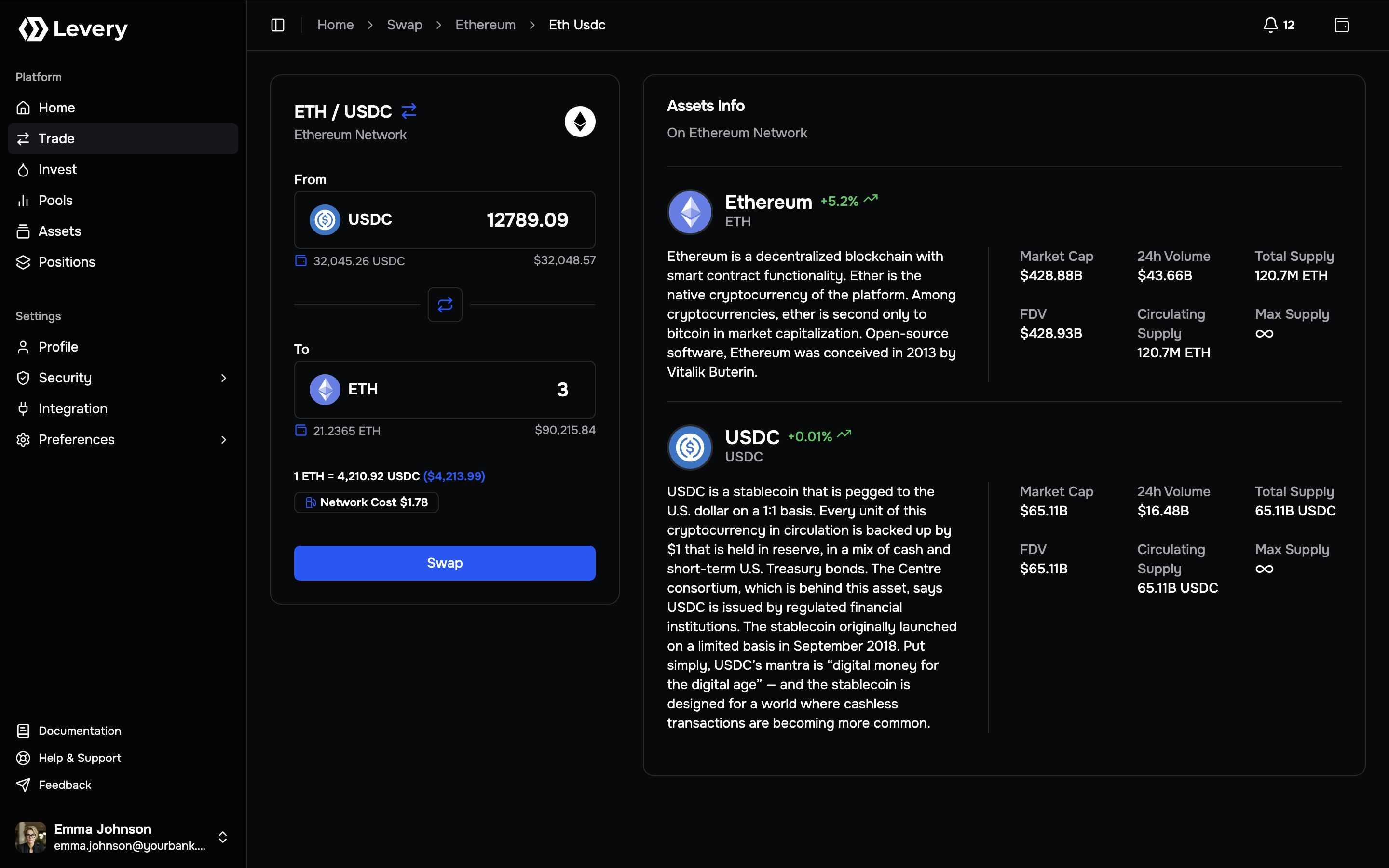 Select a pool, choose direction, enter amounts, review fees and gas, then execute the swap. The swap button is enabled only when an on-chain quote is available and the account passes policy checks.
Asset profiles with project description, market/supply metrics, 24h change, and pricing sourced from trusted market price oracle feeds, enabling informed, accountable trading decisions.
Pools are identified by **pair + network** and may include pool-specific rules (fee behavior, oracle configuration,
and access policies). When the user select a pool, the Trade page binds the user’s session to that pool’s parameters.
***
## What Levery guarantees during execution
Swaps execute only when the connected account meets the institution’s pool admission rules, including roles, compliance status, and any operator-defined access constraints.
Settlement is bound to the initiating account. The compliant router prevents proceeds from being redirected to
arbitrary recipients, ensuring custody and accounting controls remain intact.
Trades are enabled only when an on-chain quote can be produced and the submitted transaction matches the same pool
parameters and account context used for enforcement and pricing.
Levery separates **execution correctness** (on-chain quote + enforced checks) from **display convenience** (fiat
conversion and informational metrics). A UI estimate is never sufficient to enable execution on its own.
***
## Execute a swap
The user opens the pair selector at the top of the swap card and selects a pool.
A pool defines:
* the two assets,
* the network,
* the fee behavior (static or dynamic),
* and the permission policy that applies to swaps.
If the connected wallet is on another network, the wallet prompts a network switch before execution.
The user selects the asset to spend in **From** and the asset to receive in **To**, and may use the flip control to reverse direction.
Direction matters because fee logic, oracle deviation rules, and policy constraints can be direction-sensitive.
Levery supports two trade intents:
* **Exact input**: the user specifies the **From** amount. The platform computes an estimated output subject to slippage protection.
* **Exact output**: the user specifies the **To** amount. The platform computes an estimated maximum input subject to slippage protection.
This choice impacts **how service fees are charged** (see below) and which trade guarantee is preserved.
The Trade page continuously requests an **on-chain quote** for the selected pool, direction, and amounts. This quote is produced by simulating the swap against the pool’s current state and enforcement rules.
Typical states include:
* **Quoting…**: the UI is fetching or refreshing a quote.
* **Ready**: a valid quote is available and the swap button can be enabled.
* **Estimate only (swap disabled)**: the UI may show an indicative estimate, but execution is blocked because a deterministic on-chain quote is not available.
Fiat prices and indicative estimates can still be shown. However, execution is enabled only when Levery can reproduce the trade deterministically on-chain under the same context used for enforcement.
Review the badges below the inputs:
* **Total fees**: the estimated aggregate of LP fee and service fee for this trade intent and direction.
* **Gas estimate**: the network fee estimate (in the chain’s native token and converted to fiat for convenience).
Final gas paid depends on network conditions. Final fees depend on the pool’s on-chain execution rules and the exact deltas realized during the swap.
If the input asset is an ERC-20 token, approvals may be required before swapping.
Many Levery deployments use a hardened allowance model:
* **Token → Permit layer approval** (authorizes the permit contract to move tokens)
* **Permit layer → Router approval** (authorizes the compliant router to spend under strict rules)
If the input asset is the chain’s native token, token approvals are not required.
The user selects **Swap** and confirms the transaction in the connected wallet.
After submission, the Trade page tracks the transaction until it is confirmed and then displays a receipt including:
* amount paid,
* amount received,
* fees charged,
* gas paid,
* and a link to view the transaction in a block explorer.
This receipt is intended for reconciliation: it reflects what was actually recorded on-chain.
***
## Exact input vs exact output
The user specifies the amount to spend. Levery computes an estimated output and enforces a **minimum amount out** (`minOut`) using slippage protection.
**Service fee behavior**
* Service fee is charged **from the specified input amount** before swap execution.
* The pool consumes the remaining amount after the service fee is withheld.
The user specifies the amount to receive. Levery computes an estimated maximum input and enforces a **maximum amount in** (`maxIn`) using slippage protection.
**Service fee behavior**
* Service fee is charged **after execution**, based on the **actual input delta** required to produce the exact output.
* The requested output amount remains exact (subject to the transaction not reverting).
**Exact input** is suitable when a precise spend amount is required. **Exact output** is suitable when a precise
receive amount is required (with a bounded maximum input).
***
## Fees explained
Levery separates fees into two categories.
LP fees are paid to liquidity providers and depend on the pool configuration.
* **Static pools**: a fixed fee rate applies.
* **Dynamic pools**: fee rate can adjust on-chain based on market context (for example, deviation between pool price and an oracle reference), to support market integrity policies.
The institution operating the Levery instance charge a service fee. This fee is collected **on-chain** and routed to the service fee vault for distribution according to institutional rules.
Service fee timing depends on trade intent:
* **Exact input**: charged from input *before* swap execution.
* **Exact output**: charged *after* execution using the realized input delta.
Fees are enforced by on-chain logic. The UI displays estimates for transparency, but the final amounts are determined
by the transaction’s executed deltas.
***
## Slippage protection and deadlines
Every swap includes two execution protections:
* **Slippage tolerance**
* Exact input swaps enforce a minimum output (`minOut`).
* Exact output swaps enforce a maximum input (`maxIn`).
* **Deadline**
* Transactions must execute before a deadline timestamp. After that, execution is rejected.
If the pool price moves beyond tolerance, the quote becomes stale, or the deadline expires, the transaction can revert
rather than execute at an unexpected price.
***
## Pricing and data provenance
Levery uses two separate pricing concepts on the Trade page.
Execution pricing comes from an on-chain quote that simulates the swap against:
* the pool’s live state,
* the pool’s fee logic (including dynamic fees),
* and the institution’s on-chain enforcement rules.
If an on-chain quote cannot be produced, swapping stays disabled.
Display pricing is used for fiat conversion, asset summaries, and historical context. It is sourced from the institution’s configured pricing feeds backed by oracle infrastructure and indexed for real-time and historical reference.
This improves trust because pricing provenance is consistent, auditable, and not dependent on ad-hoc client-side API calls.
***
## Compliance and settlement model
Levery is designed to provide DEX-like execution without losing compliance control:
* **On-chain admission checks**: swaps are rejected if the account fails the pool’s access policy at execution time.
* **Initiator-only settlement**: swap proceeds cannot be delivered to arbitrary receivers.
* **Context-bound quoting**: quotes are computed for the same pool parameters and account context required for execution.
* **Audit readiness**: trades are traceable to transaction hashes and on-chain state transitions.
If a trade fails or is blocked, the user should share the pool (pair + network), the attempted amount, and the
transaction hash (if one was submitted). This lets the operator reconcile outcomes directly against on-chain records.
***
## Troubleshooting
Common causes include a disconnected wallet, the wrong network, no executable on-chain quote (liquidity/RPC/config),
or the account not being permitted for the selected pool.
Common causes include slippage exceeding tolerance, an expired deadline, insufficient balance, missing approvals (or
allowance not yet reflected), or an on-chain policy rule rejecting execution.
ERC-20 input assets may require approvals before swapping. Once the required approval step(s) are completed, the swap
can be quoted again and submitted for execution.
Quote failures may mean the pool is unavailable, the quoter/RPC is unstable, or policy rejected execution. Retry, refresh, switch RPC, or pick another pool.
Select a pool, choose direction, enter amounts, review fees and gas, then execute the swap. The swap button is enabled only when an on-chain quote is available and the account passes policy checks.
Asset profiles with project description, market/supply metrics, 24h change, and pricing sourced from trusted market price oracle feeds, enabling informed, accountable trading decisions.
Pools are identified by **pair + network** and may include pool-specific rules (fee behavior, oracle configuration,
and access policies). When the user select a pool, the Trade page binds the user’s session to that pool’s parameters.
***
## What Levery guarantees during execution
Swaps execute only when the connected account meets the institution’s pool admission rules, including roles, compliance status, and any operator-defined access constraints.
Settlement is bound to the initiating account. The compliant router prevents proceeds from being redirected to
arbitrary recipients, ensuring custody and accounting controls remain intact.
Trades are enabled only when an on-chain quote can be produced and the submitted transaction matches the same pool
parameters and account context used for enforcement and pricing.
Levery separates **execution correctness** (on-chain quote + enforced checks) from **display convenience** (fiat
conversion and informational metrics). A UI estimate is never sufficient to enable execution on its own.
***
## Execute a swap
The user opens the pair selector at the top of the swap card and selects a pool.
A pool defines:
* the two assets,
* the network,
* the fee behavior (static or dynamic),
* and the permission policy that applies to swaps.
If the connected wallet is on another network, the wallet prompts a network switch before execution.
The user selects the asset to spend in **From** and the asset to receive in **To**, and may use the flip control to reverse direction.
Direction matters because fee logic, oracle deviation rules, and policy constraints can be direction-sensitive.
Levery supports two trade intents:
* **Exact input**: the user specifies the **From** amount. The platform computes an estimated output subject to slippage protection.
* **Exact output**: the user specifies the **To** amount. The platform computes an estimated maximum input subject to slippage protection.
This choice impacts **how service fees are charged** (see below) and which trade guarantee is preserved.
The Trade page continuously requests an **on-chain quote** for the selected pool, direction, and amounts. This quote is produced by simulating the swap against the pool’s current state and enforcement rules.
Typical states include:
* **Quoting…**: the UI is fetching or refreshing a quote.
* **Ready**: a valid quote is available and the swap button can be enabled.
* **Estimate only (swap disabled)**: the UI may show an indicative estimate, but execution is blocked because a deterministic on-chain quote is not available.
Fiat prices and indicative estimates can still be shown. However, execution is enabled only when Levery can reproduce the trade deterministically on-chain under the same context used for enforcement.
Review the badges below the inputs:
* **Total fees**: the estimated aggregate of LP fee and service fee for this trade intent and direction.
* **Gas estimate**: the network fee estimate (in the chain’s native token and converted to fiat for convenience).
Final gas paid depends on network conditions. Final fees depend on the pool’s on-chain execution rules and the exact deltas realized during the swap.
If the input asset is an ERC-20 token, approvals may be required before swapping.
Many Levery deployments use a hardened allowance model:
* **Token → Permit layer approval** (authorizes the permit contract to move tokens)
* **Permit layer → Router approval** (authorizes the compliant router to spend under strict rules)
If the input asset is the chain’s native token, token approvals are not required.
The user selects **Swap** and confirms the transaction in the connected wallet.
After submission, the Trade page tracks the transaction until it is confirmed and then displays a receipt including:
* amount paid,
* amount received,
* fees charged,
* gas paid,
* and a link to view the transaction in a block explorer.
This receipt is intended for reconciliation: it reflects what was actually recorded on-chain.
***
## Exact input vs exact output
The user specifies the amount to spend. Levery computes an estimated output and enforces a **minimum amount out** (`minOut`) using slippage protection.
**Service fee behavior**
* Service fee is charged **from the specified input amount** before swap execution.
* The pool consumes the remaining amount after the service fee is withheld.
The user specifies the amount to receive. Levery computes an estimated maximum input and enforces a **maximum amount in** (`maxIn`) using slippage protection.
**Service fee behavior**
* Service fee is charged **after execution**, based on the **actual input delta** required to produce the exact output.
* The requested output amount remains exact (subject to the transaction not reverting).
**Exact input** is suitable when a precise spend amount is required. **Exact output** is suitable when a precise
receive amount is required (with a bounded maximum input).
***
## Fees explained
Levery separates fees into two categories.
LP fees are paid to liquidity providers and depend on the pool configuration.
* **Static pools**: a fixed fee rate applies.
* **Dynamic pools**: fee rate can adjust on-chain based on market context (for example, deviation between pool price and an oracle reference), to support market integrity policies.
The institution operating the Levery instance charge a service fee. This fee is collected **on-chain** and routed to the service fee vault for distribution according to institutional rules.
Service fee timing depends on trade intent:
* **Exact input**: charged from input *before* swap execution.
* **Exact output**: charged *after* execution using the realized input delta.
Fees are enforced by on-chain logic. The UI displays estimates for transparency, but the final amounts are determined
by the transaction’s executed deltas.
***
## Slippage protection and deadlines
Every swap includes two execution protections:
* **Slippage tolerance**
* Exact input swaps enforce a minimum output (`minOut`).
* Exact output swaps enforce a maximum input (`maxIn`).
* **Deadline**
* Transactions must execute before a deadline timestamp. After that, execution is rejected.
If the pool price moves beyond tolerance, the quote becomes stale, or the deadline expires, the transaction can revert
rather than execute at an unexpected price.
***
## Pricing and data provenance
Levery uses two separate pricing concepts on the Trade page.
Execution pricing comes from an on-chain quote that simulates the swap against:
* the pool’s live state,
* the pool’s fee logic (including dynamic fees),
* and the institution’s on-chain enforcement rules.
If an on-chain quote cannot be produced, swapping stays disabled.
Display pricing is used for fiat conversion, asset summaries, and historical context. It is sourced from the institution’s configured pricing feeds backed by oracle infrastructure and indexed for real-time and historical reference.
This improves trust because pricing provenance is consistent, auditable, and not dependent on ad-hoc client-side API calls.
***
## Compliance and settlement model
Levery is designed to provide DEX-like execution without losing compliance control:
* **On-chain admission checks**: swaps are rejected if the account fails the pool’s access policy at execution time.
* **Initiator-only settlement**: swap proceeds cannot be delivered to arbitrary receivers.
* **Context-bound quoting**: quotes are computed for the same pool parameters and account context required for execution.
* **Audit readiness**: trades are traceable to transaction hashes and on-chain state transitions.
If a trade fails or is blocked, the user should share the pool (pair + network), the attempted amount, and the
transaction hash (if one was submitted). This lets the operator reconcile outcomes directly against on-chain records.
***
## Troubleshooting
Common causes include a disconnected wallet, the wrong network, no executable on-chain quote (liquidity/RPC/config),
or the account not being permitted for the selected pool.
Common causes include slippage exceeding tolerance, an expired deadline, insufficient balance, missing approvals (or
allowance not yet reflected), or an on-chain policy rule rejecting execution.
ERC-20 input assets may require approvals before swapping. Once the required approval step(s) are completed, the swap
can be quoted again and submitted for execution.
Quote failures may mean the pool is unavailable, the quoter/RPC is unstable, or policy rejected execution. Retry, refresh, switch RPC, or pick another pool.