

- Full-range positions (maximally wide band), and
- Custom-range positions (finite band for higher concentration).
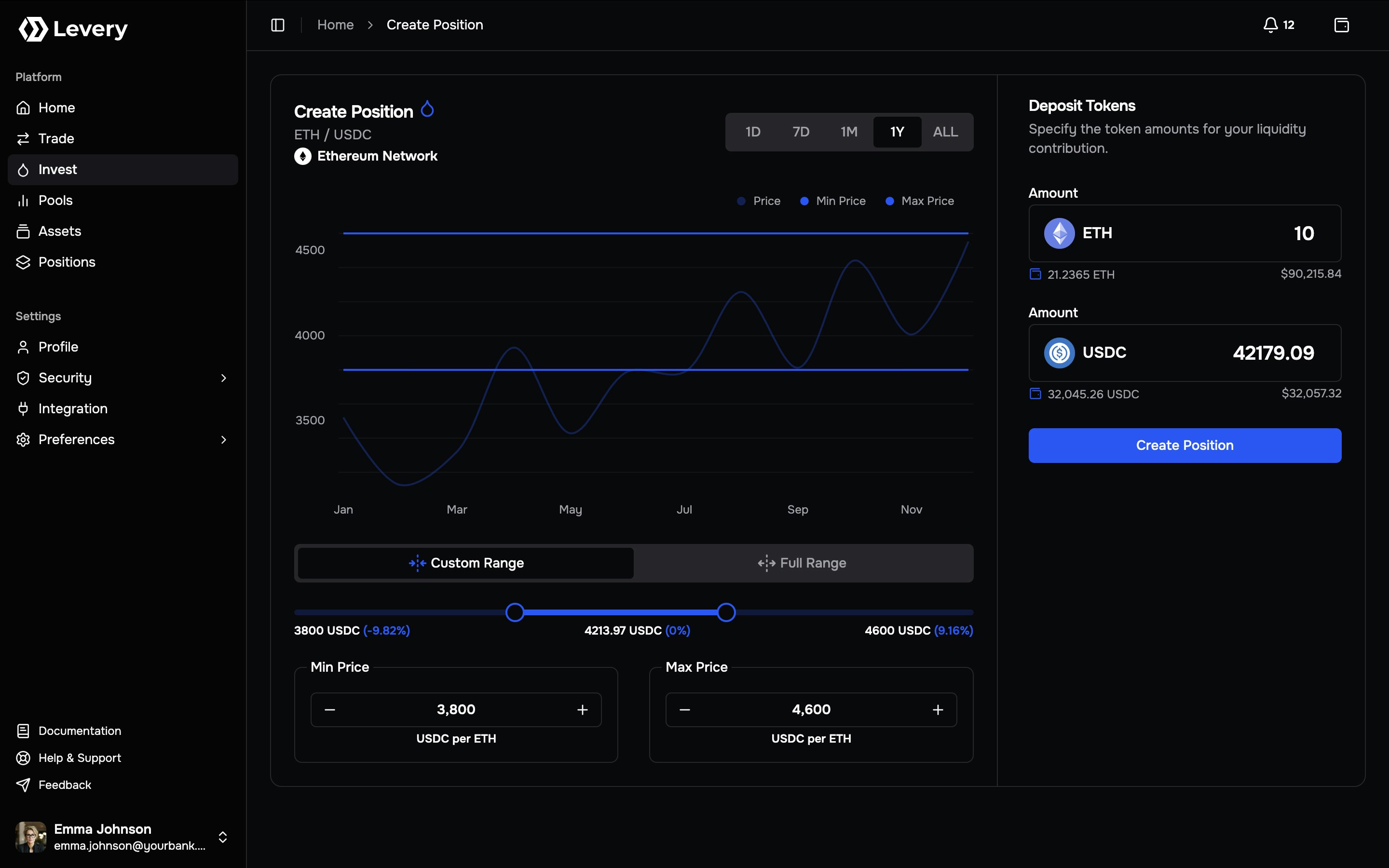
How range-based positions behave
A position is defined by:- Pair:
Token0 / Token1 - Range: Min Price and Max Price
- Liquidity: the minted on-chain amount derived from deposited token amounts and the selected ticks
- LP fees accrue when swaps execute while the position is active.
- A position is active when the pool price is within the selected range.
- If the pool uses dynamic LP fees, the realized LP fee rate can vary under the pool’s configured logic.
Authoritative outcomes are on-chain. Interface values are derived from contract state, logs, and indexer
reconciliation, and can be independently verified via transaction hashes and state reads.
Price direction and deposit composition
Prices are displayed in a consistent quote direction. Deposit requirements are determined by the relationship between the current price and the selected band:Price inside the selected range
The position requires both tokens. The interface typically computes the corresponding amount on the other side so the deposit matches the selected range geometry.
Price outside the selected range
The position becomes effectively single-sided:
- Below range → Token0-only
- Above range → Token1-only
If the current price is inside the selected range and one side is zero, the position creation transaction is rejected.
Both token amounts must be provided (often via auto-fill on the second side).
Full range vs custom range
Full range and custom range are two strategies over the same range-based position model.Full Range
Uses the widest admissible band for the pool. The position is typically active across most market states overall now.Suitable when prioritizing continuity of activity and minimizing out-of-range events, accepting lower fee density per unit of capital.
Custom Range
Defines a finite Min/Max band around a target price region. The position becomes inactive when price exits the band.Suitable when maximizing fee density near an expected trading band, accepting a higher probability of moving out of range.
Ticks and range granularity
Ranges are implemented using discrete ticks. Each pool defines atickSpacing, which constrains the minimum step size for range movement.
Operationally:
- Slider selection snaps to tick boundaries.
- Min/Max step controls adjust by tick increments.
- Zoom affects visualization only; it does not alter the selected tick boundaries.
Costs, fees, and what accrues
Liquidity provisioning involves distinct accounting categories:LP fees (earned)
Accrue when swaps execute while the position is active. Realized earnings depend on executed volume, fee configuration (static/dynamic), and the position’s liquidity share at active ticks.
Network gas (paid)
Required for approvals and for the position creation transaction.
Service fees and policy constraints
Service fees are not charged on liquidity events (mint, increase, decrease, collect, close). They are applied only on swap execution flows.Liquidity provisioning can still be subject to institutional controls, such as eligibility checks, allowlists, and risk-tier rules, enforced by the venue’s policy layer.
Pricing layers and provenance
The Invest page commonly uses two pricing layers with different objectives:Execution-relevant pool price
Range geometry, in-range status, and token composition are derived from the pool’s on-chain state (e.g., sqrtPrice/tick). This is the source of truth for execution outcomes.
Fiat valuation and history
Fiat conversions and historical charts are backed by institution-approved pricing feeds (oracle and indexed market data), supporting auditability and consistent reporting.
Create a liquidity position
1
Open Invest for the target pool
Access the pool’s Invest screen (commonly via Pools → Invest). Validate:
- the chain/network where the pool is deployed,
- the pair (
Token0 / Token1), - and the displayed price direction used for Min/Max inputs.
2
Connect a wallet and align the network
Select Connect Wallet and connect a wallet authorized to interact with the institution’s venue.If the wallet network does not match the pool’s chain, execution is blocked until the wallet network is switched. Some connectors can request a network switch; otherwise, manual selection in the wallet is required.
3
Select range strategy and define the band
Choose Full Range for a maximal band or Custom Range for a finite band.For Custom Range:
- set the band using the slider,
- refine Min/Max using numeric inputs,
- and apply tick-step controls for precision.
4
Enter deposit amounts
In Deposit Tokens, enter the intended contribution amount.The interface computes deposit composition from:
- current pool price state,
- selected tick boundaries,
- and range liquidity math (mapping token amounts to minted liquidity).
5
Complete token approvals (ERC-20 only)
ERC-20 deposits generally require allowances before funds can be pulled during position creation. Many Levery deployments use a hardened two-layer allowance model:
- Token → Permit2 (token allowance granted to Permit2)
- Permit2 → Position Manager (Permit2 allowance granted to the pool’s position manager)
6
Submit and confirm position creation
Submitting broadcasts a single on-chain execution that:
- mints liquidity for the selected ticks, and
- settles the token pair transfer required for that mint.
7
Verify and monitor the position
After confirmation:
- the position becomes visible in Positions,
- in-range status and composition are tracked over time,
- and fee accrual is exposed through on-chain accounting.
Troubleshooting
Create button disabled
Typical causes: wallet not connected, network mismatch, pool state not loaded, or missing token metadata required to compute deposits.
Both token amounts required
If current price is inside the selected band, both sides must be non-zero. Single-sided deposits only succeed when
price is outside the band.
Approval required
One or both allowance layers may be missing. Complete Token → Permit2 and Permit2 → Position Manager approvals, then
retry after confirmations.
Provisioning not authorized
Some pools restrict liquidity providers. If provisioning is blocked by policy or allowlisting, an institution
administrator must enable liquidity permission for the account.
Simulation failed / transaction reverted
Common causes: insufficient balance, stale allowance state, invalid tick ordering, or enforcement by pool policies and
permission modules. Refreshing state after confirmations can resolve indexer-latency symptoms.
Network mismatch
Wallet network must match the pool’s chain. If connector switching fails, manual wallet network selection is required before retrying.
Information useful for support and reconciliation
When escalation is required, provide: chain id, pool id, selected Min/Max, deposit amounts, and transaction hashes for
approvals and the create-position attempt.
Risk notes
Liquidity provisioning is market exposure, not guaranteed yield.Range and activity risk
When price exits the selected band, the position stops earning fees until price returns. Narrower bands can increase fee density but increase the probability of range exit.
Composition and performance risk
Token composition changes as price traverses the band. Relative to holding the tokens, performance may underperform depending on price path and fee capture (impermanent loss dynamics).
Smart contract and network risk
Outcomes depend on contract behavior, network finality, and execution conditions. Institutions typically mitigate risk
through audits, controlled deployments, and operational monitoring.
Eligibility checks, allowlists, and pool-level controls can restrict liquidity provisioning. If provisioning is
blocked, resolution requires an operator action under the institution’s governance and compliance process.