

What end users can do
- Review all their positions by pool and network.
- Open a position to inspect range status, current price, and allocation.
- Add or remove liquidity for an existing position.
- Collect accrued LP fees when available.
- Use position identifiers and transaction hashes for reconciliation.
Positions list
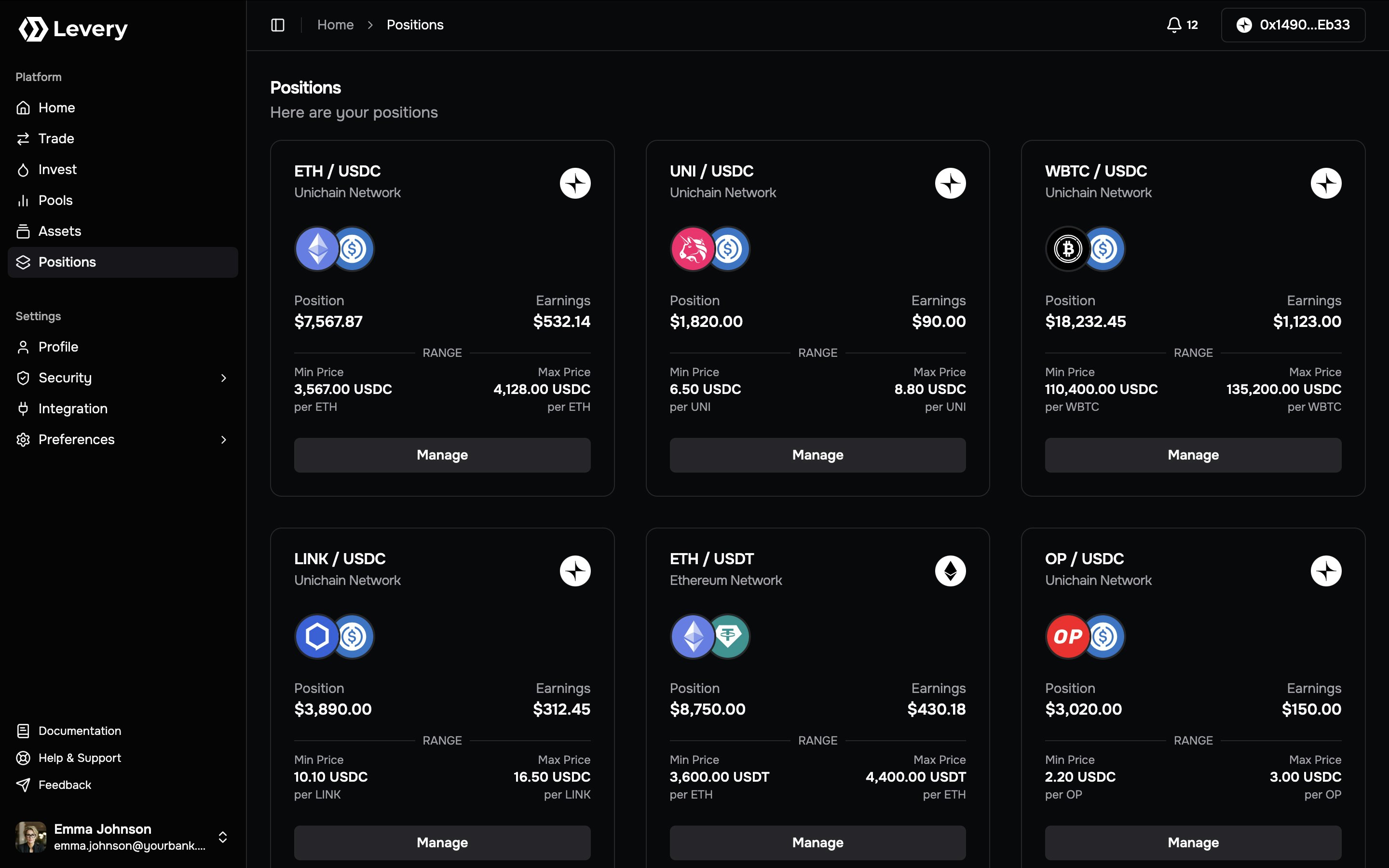
- Market + network: The pool pair (
Token0 / Token1) and the chain where the position is held. - Position ID: A stable identifier used for investigation and support.
- Range status: A visible In Range state when the pool price is inside the selected band.
- Position value: An indicative valuation in the venue’s display currency.
- Earnings: Estimated uncollected fees when available.
- Range bounds: Min and Max price labels for the position’s band.
- Manage action: Opens the detailed position view for lifecycle actions.
Position detail view
Selecting Manage opens a detailed view of the position’s range, allocation, and fee status.Header and range chart
The header and chart area typically show:- Pair, chain, and position ID for precise identification.
- Range status badges such as In Range and Full Range.
- Price visualization with markers for current price, Min Price, and Max Price.
- Time window controls (for example, 1D, 7D, 1M, 1Y, ALL) that adjust the visible chart window.
- Min/Max/Market price readouts for the selected period.
Position summary panel
The right-side panel typically includes:- Position value in the venue display currency.
- Allocation with per-token amounts and a proportional split bar.
- Add Liquidity and Remove Liquidity actions.
- Fees Earned with available amount and per-token breakdown.
- Collect Fees to claim accrued LP fees.
- Collected History for past fee claims when present.
Status and fee behavior
- A position is active when the pool price is within the selected range.
- LP fees accrue only while the position is active and swaps execute in-range.
- If the pool uses dynamic LP fees, the realized fee rate can vary under the pool’s configured logic, in order to protect the liquidity provider from impermanent losses.
- See more information and how dynamic fees are calculated at: Dynamic Fees
Values shown in the interface are indicative. The authoritative record for ownership, liquidity, and fees is on-chain
state and transaction receipts.
Manage a position
1
Open the position
Go to Positions, locate the target card, and select Manage. Confirm the pair, chain, and position ID.
2
Review range and allocation
Check Min/Max price, the current market price, and whether the position is In Range. Review the token allocation
and position value.
3
Add or remove liquidity
Use Add Liquidity or Remove Liquidity and enter the intended amounts. ERC-20 tokens require approvals before
execution, and the wallet must be connected on the pool’s chain.
4
Collect fees
When Fees Earned shows an available amount, select Collect Fees to claim the position’s accrued LP fees.
5
Confirm the on-chain receipt
Confirm the transaction in your wallet and retain the transaction hash for reconciliation and audit workflows.
Execution prerequisites and policy gates
Liquidity lifecycle actions are enforced on-chain and can be blocked if any condition fails.- Wallet connection and chain alignment: Actions execute only on the pool’s network.
- Permission checks: Liquidity permissions, pool-required roles, and institution policy gates are enforced at execution time.
- Ownership verification: Position modifications verify the authorized owner of the position token.
- Pause controls: Global or per-pool pause states halt liquidity actions.
- Limits and deadlines: Liquidity updates validate minimum amounts and time bounds; failures revert.
End-user actions on this page map to on-chain liquidity lifecycle calls (increase, decrease, collect, close) and are
rejected when permissions, roles, or pause controls disallow execution.
Troubleshooting
Action disabled
Most commonly caused by a disconnected wallet, wrong network, or a policy gate that blocks liquidity actions.
Approval required
ERC-20 liquidity changes require approvals. Many deployments use Token → Permit2 and Permit2 → Position Manager
allowances before execution can proceed.
Transaction reverted
Reverts can result from insufficient balance, invalid limits (deadlines or minimum amounts), or on-chain policy checks
failing at execution time.
Fees not accruing
LP fees accrue only when the position is in range and swaps execute. Out-of-range positions or low activity may show
zero fees.
Network mismatch
Liquidity actions execute only on the pool’s chain. Switch the wallet to the pool’s network and retry.
Ownership and auditability
- Liquidity positions are represented on-chain as non-transferable (soulbound) ERC-721 tokens bound to the verified owner.
- Position state, liquidity updates, and fee claims are recorded as on-chain events that can be reconciled by transaction hash.